Notion AI: The Smart Workspace Assistant Changing the Way We Get Work Done
Discover how Notion AI helps users write faster, automate tasks, summarize content, manage projects, and boost productivity with powerful AI-driven workspace tools.

If you’ve ever looked at your screen late in the day and thought, “How is there still this much to do?” you’re not alone. Work today doesn’t look like it used to. We’re juggling notes, projects, documents, messages, deadlines, and collaboration across teams that may never even meet in person, and somewhere in the middle of all that noise, tools like Notion AI have quietly stepped in, trying to make sense of it all.
Notion AI isn’t just another app you open and forget. It’s built right into the Notion workspace itself, designed to help you write, organize, summarize, and automate tasks without constantly jumping between different platforms. In a world where attention is fragmented and time feels shorter than ever, that matters more than it sounds.
Let’s break it down in a clear, practical way what it is, how it works, and why so many people are paying attention to it.
What Is Notion AI and Why It Matters in Modern Workspaces
At its core, Notion AI is an intelligent assistant embedded directly into the Notion workspace. That means you don’t need to leave your notes, documents, or project pages to use it. It lives where your work already lives.
Instead of acting like a separate tool that pulls you away from your workflow, it works alongside your content. It can help you draft writing, summarize long pages, generate ideas, and even answer questions based on what’s already inside your workspace. That context-aware ability is what sets it apart. It’s not just generating generic responses; it’s working with the information you already have in front of you.
For students, freelancers, entrepreneurs, content creators, and business professionals, this kind of integration can feel less like a feature and more like a shift in how work gets done.
AI-Powered Writing Assistance Inside Notion AI
One of the most widely used parts of Notion AI is its writing support, and honestly, it’s easy to see why. Writing is one of those tasks that looks simple until you actually have to do it every day. Whether it’s emails, reports, blog posts, or internal documentation, the pressure to produce clear and polished content never really stops.
Notion AI helps ease that pressure by assisting with tasks like:
Generating blog posts and written content
Drafting emails and professional messages
Creating structured reports
Rewriting and improving existing content
Fixing grammar and clarity issues
Adjusting tone depending on context
Translating text when needed
Instead of staring at a blank page, users can start with a draft and refine from there, and sometimes, that’s all it takes to get momentum going again. It doesn’t replace the writer; it supports them when ideas are slow to form or when the wording just isn’t coming together.
Instant Summarization for Long Documents and Notes
If there’s one thing most professionals have in common, it’s too much reading. Meeting notes, research documents, long reports, and information often get buried under paragraphs of detail. That’s where Notion AI’s summarization feature becomes especially useful; with a few clicks, long content can be condensed into shorter, clearer insights. The goal isn’t to remove meaning, but to highlight what matters most.
This helps users:
Quickly understand meeting outcomes
Extract key points from research
Review long project documentation
Save time when catching up on work
In fast-moving environments, this kind of clarity can make a real difference. Instead of spending an hour reading, you might only need a few minutes to get what you need.
AI Meeting Notes That Capture What Matters
Meetings are essential, but let’s be honest, they can also be overwhelming. Information comes fast, decisions are made quickly, and action items can easily get lost in the shuffle.
Notion AI helps by assisting with meeting notes in a more structured way. It can help generate summaries, identify key discussion points, and highlight action items that need follow-up. This means teams can walk away with something more useful than just raw notes. They get clarity on what was said and what needs to happen next. It’s not about replacing human input; it’s about making sure nothing important slips through the cracks.
Smarter Search and Knowledge Management with Notion AI
As workspaces grow, so does the challenge of finding information, and anyone who’s worked inside a large project knows the feeling of thinking, “I know I wrote this somewhere…”
Notion AI addresses this by allowing users to ask questions in natural language. Instead of digging through folders or pages, you can simply ask what you need and get relevant information pulled from your workspace. This turns your notes and documents into something closer to a searchable knowledge system rather than static storage.
For teams, this is especially useful because shared knowledge becomes easier to access and use, rather than being buried in individual pages or forgotten documents.
Database Automation and Smarter Organization
One of the more quietly powerful features of Notion AI is how it helps with organization behind the scenes.
It can assist in:
Categorizing information
Generating tags
Filling database properties
Structuring content more efficiently
These are the kinds of tasks that often feel small individually but add up over time. Automating them reduces repetitive effort and keeps systems cleaner without constant manual maintenance. For people managing projects, content pipelines, or business operations, this can significantly improve workflow consistency.
Custom AI Agents and Workflow Automation
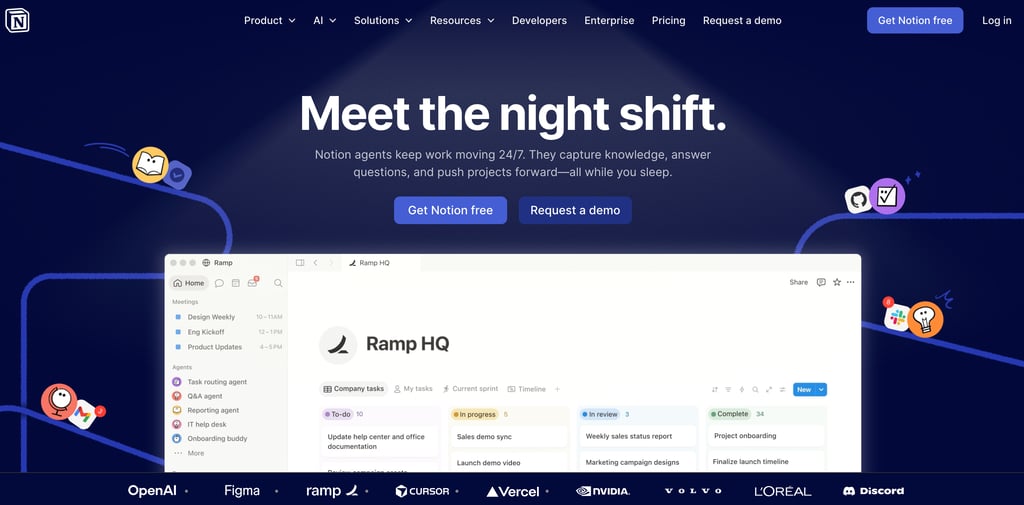
Another evolving part of Notion AI is the introduction of AI agents designed to handle recurring tasks and support routine workflows. These agents are intended to help teams manage repetitive processes, update information, and support day-to-day operations without requiring constant manual input. In practical terms, that means less time spent repeating the same steps and more time focusing on meaningful work. It’s a shift toward automation that doesn’t feel disconnected from your workspace, but instead becomes part of it.
Who Actually Benefits Most from Notion AI
Notion AI isn’t built for just one type of user. It’s flexible enough to support different roles and needs.
Content Creators - For writers, bloggers, and creators, it helps generate ideas, build outlines, and improve drafts without slowing down the creative process.
Students - For studying and academic work, it helps summarize material, organize notes, and simplify complex information into easier-to-review.
Entrepreneurs - For business owners, it supports planning, organizing operations, and managing repetitive administrative work that often takes up too much time.
Remote Teams - For distributed teams, it improves collaboration through shared summaries, updates, and centralized knowledge.
Freelancers - For independent professionals, it helps manage proposals, client communication, documentation, and project organization more efficiently.
Benefits of Using Notion AI in Daily Work
When you step back, the value of Notion AI isn’t just in individual features; it’s in how they work together.
Saving Time Across Tasks - From writing to summarizing to organizing, repetitive tasks take less effort.
Improving Everyday Productivity - Work flows faster, especially when you’re not constantly switching between tools.
Keeping Everything in One Place - Instead of juggling multiple apps, your notes, tasks, and AI assistance live in a single workspace.
Better Team Collaboration - Shared information becomes easier to access, understand, and act on.
Supporting Idea Generation - When creativity slows down, AI can help spark direction and structure.
Real-World Uses of Notion AI Across Workflows
People are already using Notion AI in practical ways, such as:
Creating blog content and articles
Running marketing campaigns
Organizing research materials
Managing projects and tasks
Building internal knowledge bases
Writing business documentation
Preparing for meetings
Planning daily work
Its adaptability is what makes it stand out. It fits into both personal productivity systems and larger team environments without forcing a single way of working.
Is Notion AI Worth It for Everyday Users?
For anyone already using Notion, adding AI into the same environment can feel like a natural upgrade. Instead of switching between tools for writing, organizing, and searching, everything comes together in one place. The real question isn’t just whether it works, it’s whether it helps reduce friction in your daily workflow. For many users dealing with constant writing, planning, and information management, the answer leans toward yes. Time saved, even in small increments, tends to add up quickly.
Final Thoughts on Notion AI and the Future of Productivity
Notion AI isn’t trying to reinvent productivity from scratch. Instead, it quietly improves the way people already work by making familiar tasks faster, easier, and more organized. It brings writing support, summarization, search, and automation into the same environment where your work already exists; that combination is what makes it feel less like a tool and more like part of your workflow. In a world where information keeps growing, and attention keeps shrinking, tools like this are becoming less of a luxury and more of a practical advantage.
If your work involves writing, organizing, or managing information in any form, Notion AI is worth paying attention to.